Resolving blank page problem of Aurelia app with webpack on Safari
While asking users to test an Aurelia application, it appeared that it didn't work on Safari due to this error:
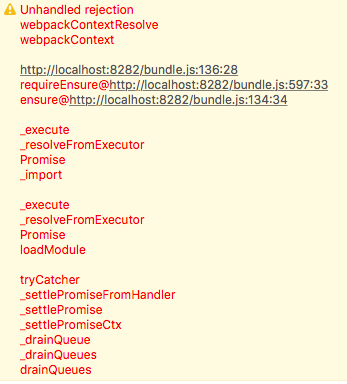
It comes from the fact that Safari doesn't support the internationalization (window.Intl) API.
In order to solve it, I had to manually include the Intl.js polyfill. Since it is already pulled as a dependency, I just had to adapt the bootstrap function of Aurelia with the setup code for Webpack of Intl.js:
bootstrap(aurelia => {
     if (!global.Intl) {
         console.log('Intl not present')
         require.ensure([
             'intl',
             'intl/locale-data/jsonp/en.js'
         ], function (require) {
             require('intl');
             require('intl/locale-data/jsonp/en.js');
             boot(aurelia);
         });
     } else {
         boot(aurelia);
     }
 });


 function boot(aurelia) {
     aurelia.use
         .standardConfiguration()
         .developmentLogging()
         .plugin('aurelia-i18n', (instance) => {
             let language = navigator.language.split('-')[0];

             // register backend plugin
             instance.i18next.use(XHR);

             function loadLocales(url, options, callback, data) {
                 switch (url) {
                     case 'en':
                         callback(enTranslations, { status: '200' });
                         break;
                     case 'fr':
                         callback(frTranslations, { status: '200' });
                         break;
                     default:
                         callback(null, { status: '404' });
                         break;
                 }
             }

             instance.setup({
                 backend: {
                     loadPath: '{{lng}}',
                     parse: (data) => data,
                     ajax: loadLocales,
                 },
                 lng: language,
                 attributes: ['t', 'i18n'],
                 fallbackLng: 'en',
                 debug: false,
             });
         });

     aurelia.start().then(() => aurelia.setRoot('app', document.body));
 }